Instagram is one of the most popular platforms for sharing videos, stories, reels, images, and IGTV content. Many users want to save Instagram content for offline viewing, reference, or personal use. However, Instagram does not provide a direct download option. That is why trusted third-party tools like Picuki and SnapInsta are widely used. In this guide, we will explain simple and safe ways to download Instagram stories and videos using these two websites. This article is written to help beginners clearly understand the process without technical difficulty.
Important Note Before You Download
Before using any Instagram downloader, keep these points in mind:
You can only download content from public Instagram accounts
Private profiles cannot be accessed
Download content for personal use only
Always respect the creator’s rights and privacy
How to Download Instagram Stories (Using Picuki)
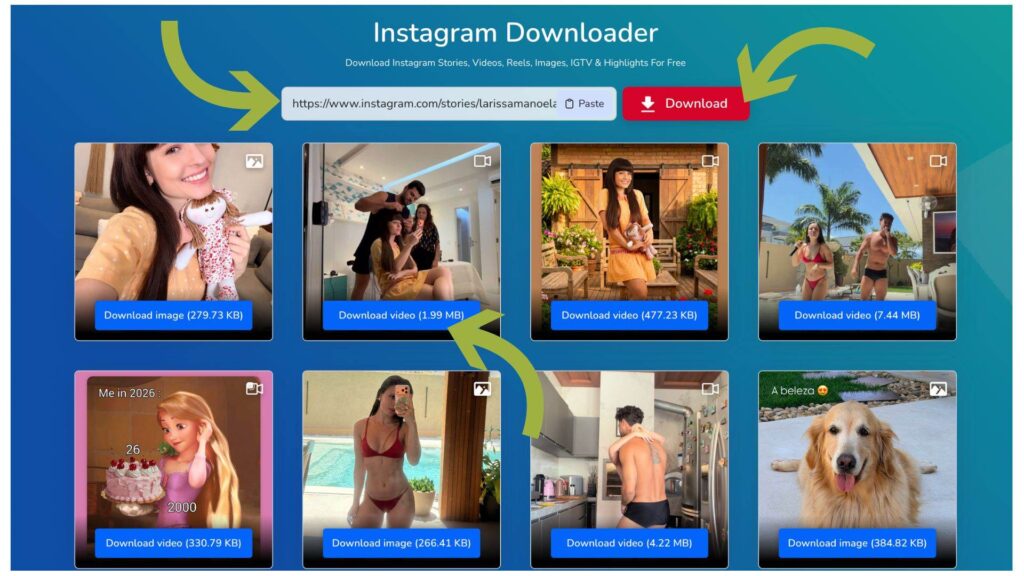
Instagram e Picuki Downloader: o guia completo para visualização e download de conteúdo 12 Picuki is a popular Instagram story downloader that allows users to browse public profiles and download stories without logging in. It is simple, browser-based, and works on both mobile and desktop.
What Is Picuki
Picuki is an online Instagram viewer and downloader that helps users view public profiles, posts, and stories anonymously. You do not need to install any app or create an account.
Steps to Download Instagram Stories Using Picuki
Open your browser and visit picuki.dev
Enter the Instagram username of the public account
User name should be like this – https://www.instagram.com/stories/larissamanoela/
Select the correct profile from the search results
If the account has active stories, they will appear at the top
Click on the story you want to download
Tap the download option and save it to your device
That’s it. The story will be saved in its original quality.
What You Can Download With Picuki
Instagram stories
Story highlights
Profile pictures
Public photos
Public videos
Why Use Picuki for Stories
No login required
Works on any device
Easy for beginners
Allows anonymous browsing
Picuki is ideal if you want to download Instagram stories quietly and quickly.
Download Instagram Videos (Using SnapInsta)
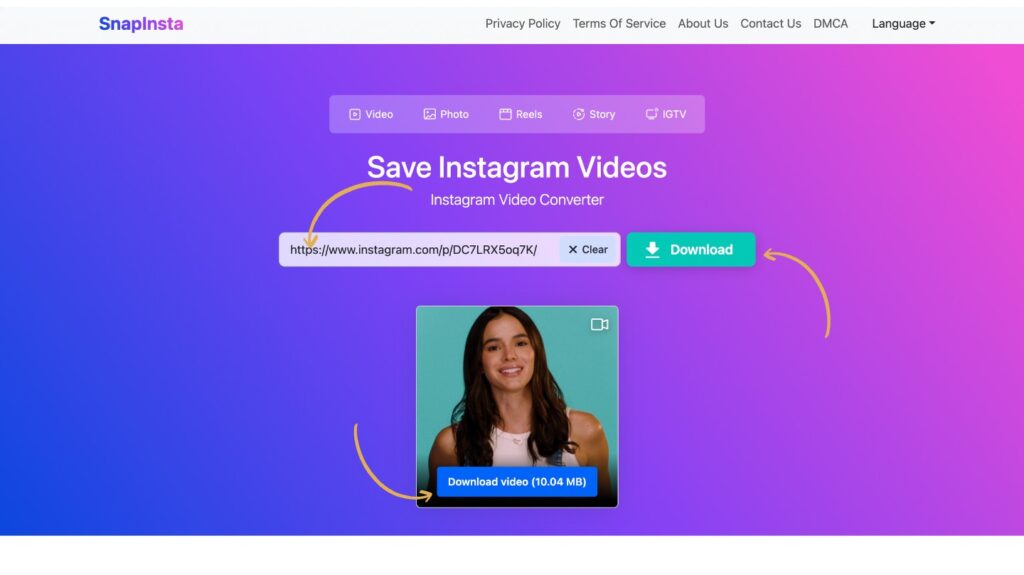
SnapInsta is another trusted Instagram Video downloader known for its fast performance and wide media support. It focuses mainly on video content such as reels, posts, and IGTV. Instagram e Picuki Downloader: o guia completo para visualização e download de conteúdo 13
What Is SnapInsta
SnapInsta is a web-based Instagram video downloader that allows users to save videos in high quality. It supports reels, IGTV, story videos, and regular video posts.
Steps to Download Instagram Videos Using SnapInsta
Open Instagram and copy the video, reel, or IGTV link
Visit the SnapInsta website
Paste the copied link into the input box
Click the download button
Choose video quality and save the file
The video will download directly to your device.
Video Types Supported by SnapInsta
Instagram reels
Video posts
IGTV videos
Story videos
Carousel videos
Why Use SnapInsta for Videos
Fast download speed
Clear video quality
No sign-up needed
Supports multiple Instagram formats
If your main goal is downloading Instagram videos or reels, SnapInsta is the better option.
Picuki vs SnapInsta – Which One Should You Use?
Both tools are useful, but each serves a different purpose.
Use Picuki If You Want
To download Instagram stories
To view profiles anonymously
To browse without copying links
Use SnapInsta If You Want
To download reels and videos
To save IGTV content
To get higher video quality
Many users keep both tools bookmarked for different use cases.
Is It Safe to Download Instagram Content Using These Tools?
Yes, both Picuki and SnapInsta are safe when used correctly. Safety tips:
Do not log in using Instagram credentials
Avoid fake sites with excessive ads
Download only from public profiles
Use content responsibly
Neither Picuki nor SnapInsta asks for personal data, which makes them safer than many mobile apps.
Frequently Asked Questions (FAQ)
Can I download Instagram stories without an account?
Yes. Picuki allows you to download stories from public accounts without logging in.
Can I download videos from private Instagram accounts?
No. Private accounts cannot be accessed by any legitimate downloader.
Are Picuki and SnapInsta free?
Yes. Both tools are free to use for downloading public Instagram content.
Can I download Instagram reels?
Yes. SnapInsta supports Instagram reel downloads in high quality.
Is it legal to download Instagram videos?
Downloading for personal use is generally acceptable. Reposting or commercial use without permission may violate copyright rules.
Why is Picuki or SnapInsta not working sometimes?
This usually happens due to server load or Instagram updates. Trying again later usually fixes the issue.
Do these tools work on mobile phones?
Yes. Both Picuki and SnapInsta work on mobile browsers and desktops. Downloading Instagram stories and videos has become easier thanks to tools like Picuki and SnapInsta. Picuki is best for viewing and downloading stories anonymously, while SnapInsta is ideal for downloading videos, reels, and IGTV content. Choose the tool based on your needs, use it responsibly, and respect content creators. With the right approach, saving Instagram content can be simple and hassle-free.